Your Headcount Plan
Shouldn't Disagree
With Workday.
Every hiring freeze, reorg, and comp cycle, someone exports a Workday roster and rebuilds the headcount plan from scratch. VersionForge keeps the plan current — hires, terminations, cost-center moves, and comp changes sync on a schedule, with PII-aware review your People Ops and FP&A teams run jointly.
Go live in under 30 minutes. No IT project required.
Built by the consultants who've wired Workday HCM into Adaptive Workforce and Pigment for organizations from 500 to 50,000 employees.
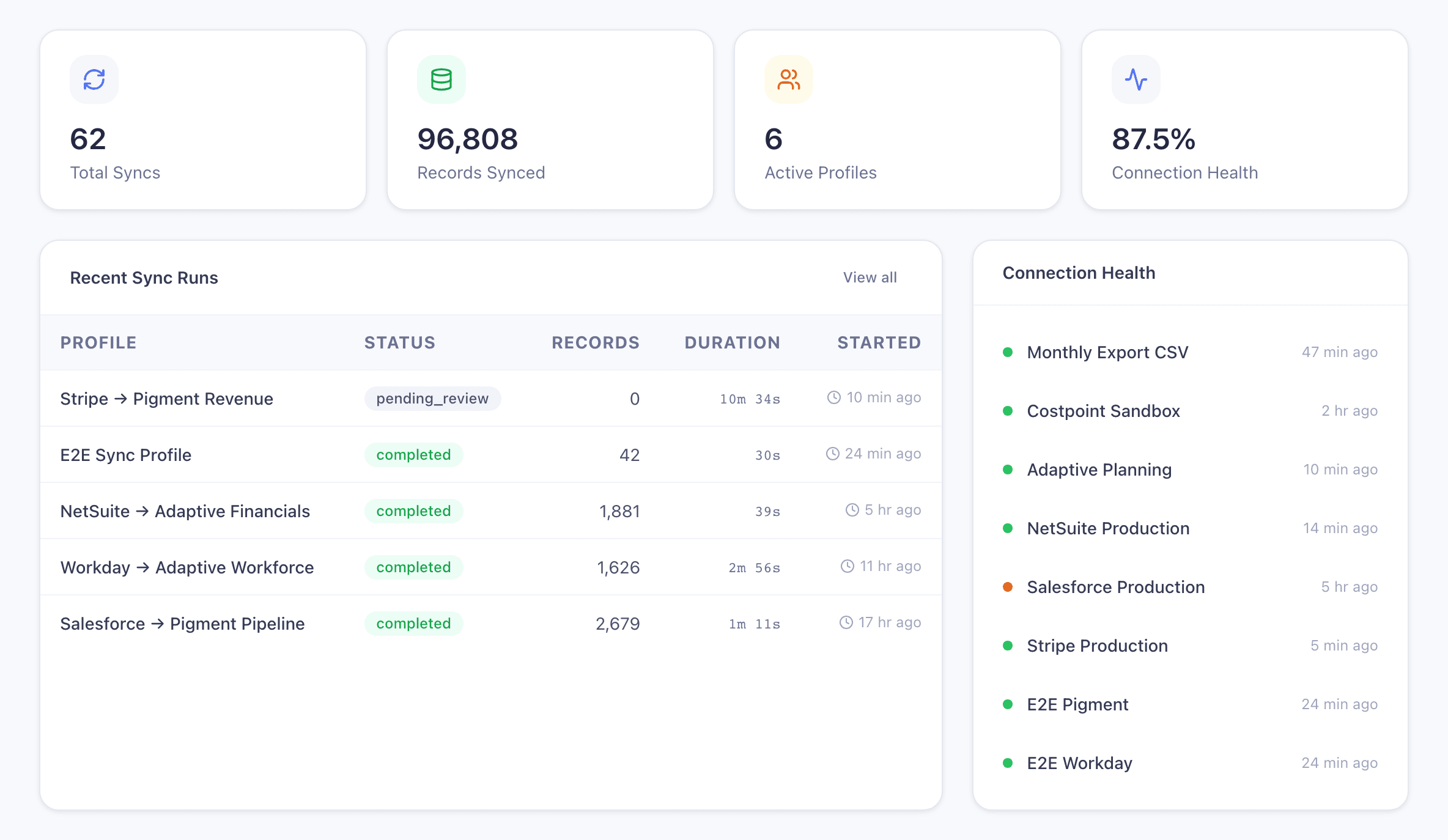
Trusted by People Ops and workforce-planning teams running Workday, ADP, and Adaptive
What a Monday Morning Headcount Sync Actually Looks Like
Your current workflow: export a Workday roster, rebuild the headcount plan in Excel, paste it into Adaptive, and wait until the next org review to find out whether the FTE totals hold. Here’s what happens instead.
Workday HCM to Adaptive Workforce
Org structure changes
A new VP joins and inherits three teams. Forty employees move cost centers. Two dozen comp adjustments post. Three people convert to part-time.
VersionForge extracts from Workday
The scheduled sync pulls the updated roster, comp records, and supervisory org tree. It diffs against last week’s committed snapshot and flags exactly what moved — hires, terms, org moves, comp changes.
HR reviews
Your workforce-planning lead opens the Safety Gate and sees 40 cost center moves and 24 comp updates. They bulk-approve the clean org moves and flag two comp changes for dual review with finance.
Headcount plan is current
Approved changes land in Adaptive Workforce or Pigment. FTE totals and cost-center rollups tie back to Workday exactly. Your Monday headcount review opens with accurate data — no spreadsheet, no ticket to HRIS.
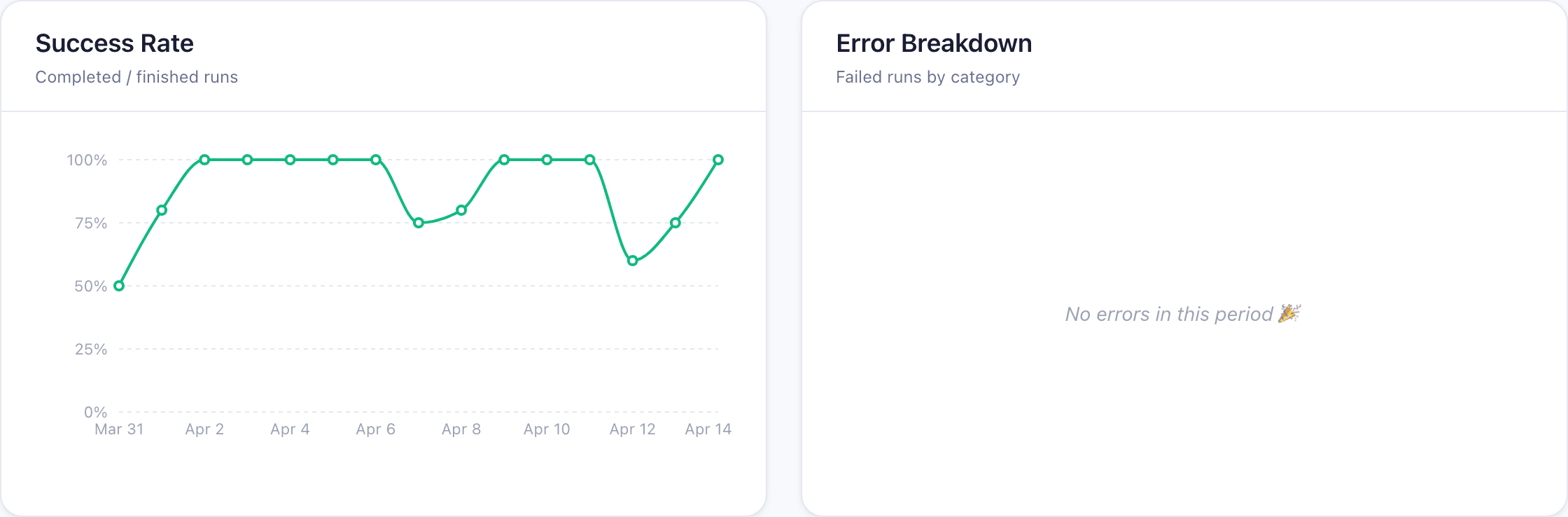
Every run, every status, in one view
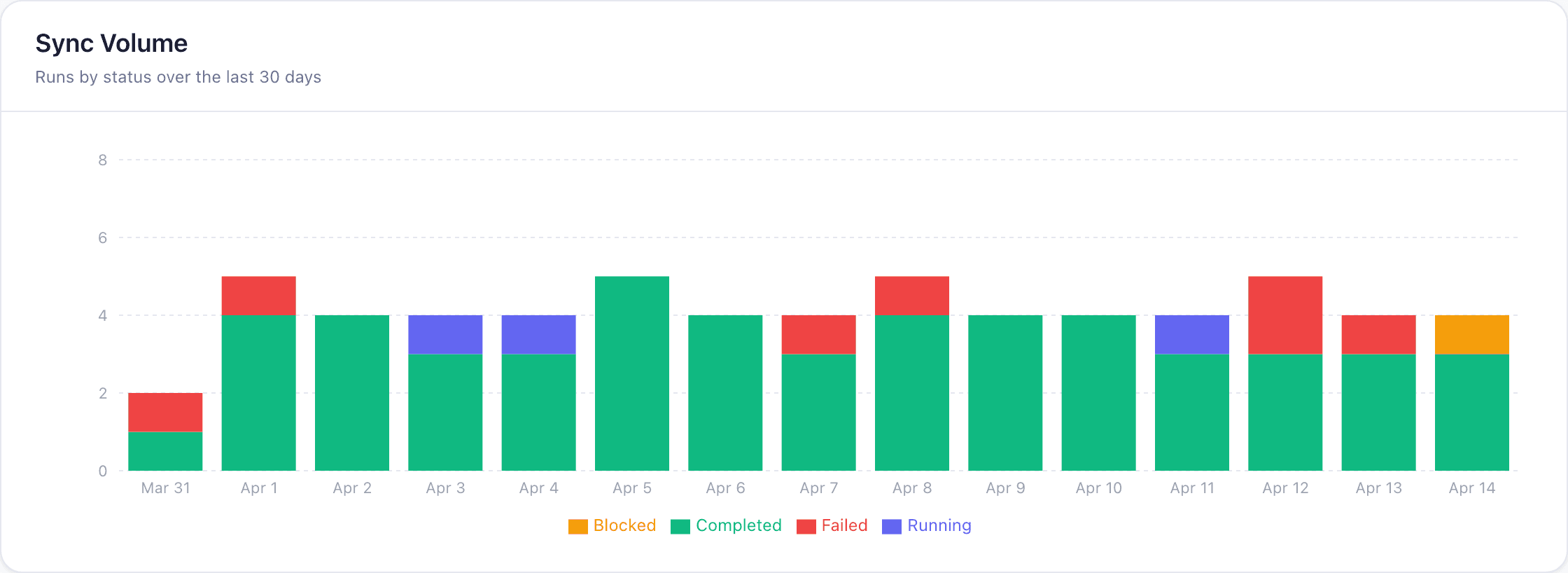
Review Every Headcount and Comp Change Before It Hits the Plan
When VersionForge syncs 25,000 employee records from Workday, your People Ops and workforce-planning leads see exactly which hires, terminations, comp updates, and org moves are about to flow into Adaptive or Pigment. Approve individually, override fields that look wrong, and route sensitive comp changes to finance for dual review.
- See every change — new hires, terminations, cost center moves, comp updates, FTE shifts — before it syncs
- Override any field inline without going back to Workday
- Auto-approve routine org moves; route comp changes to finance for dual review
- PII-aware: comp data is opt-in per Workday security group, not tenant-wide
- Nothing lands in the headcount plan until your team approves it
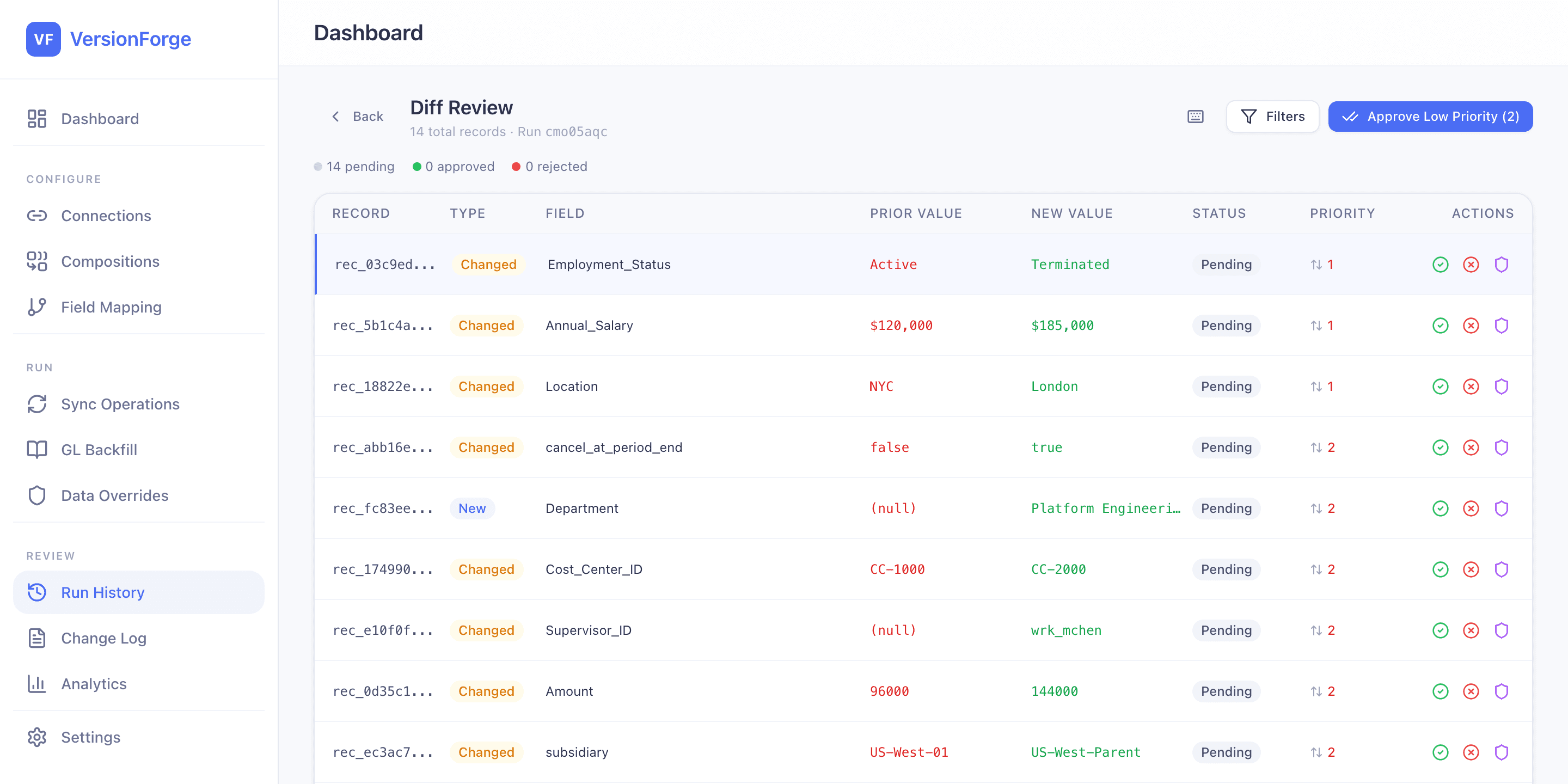
Override without leaving the app
Your Workday Data Is Messy. We Built for That.
Every HRIS integration tool works on clean demo data. Your tenant has mid-reorg supervisor nulls, cost-center churn, FTE drift, and terminated employees still showing up in last week’s plan. VersionForge handles the roster you actually have — not the roster the vendor demo pretends you have.
Workday Mid-Reorg Nulls
✗ Supervisor field goes blank during a reorganization
✓ Auto-mapped to acting manager from position management data
Cost Center Reassignments
✗ 40 employees move to a new cost center mid-quarter
✓ Batched into a single Safety Gate review with full org-chart context
FTE Ratio Drift
✗ Part-time conversions break headcount math in the plan
✓ FTE-adjusted rollups recalculated against the roster at sync time
Terminated Employee Artifacts
✗ Terminated employees still appear in the planning model weeks later
✓ Termination dates sync first and cascade through dependent dimensions
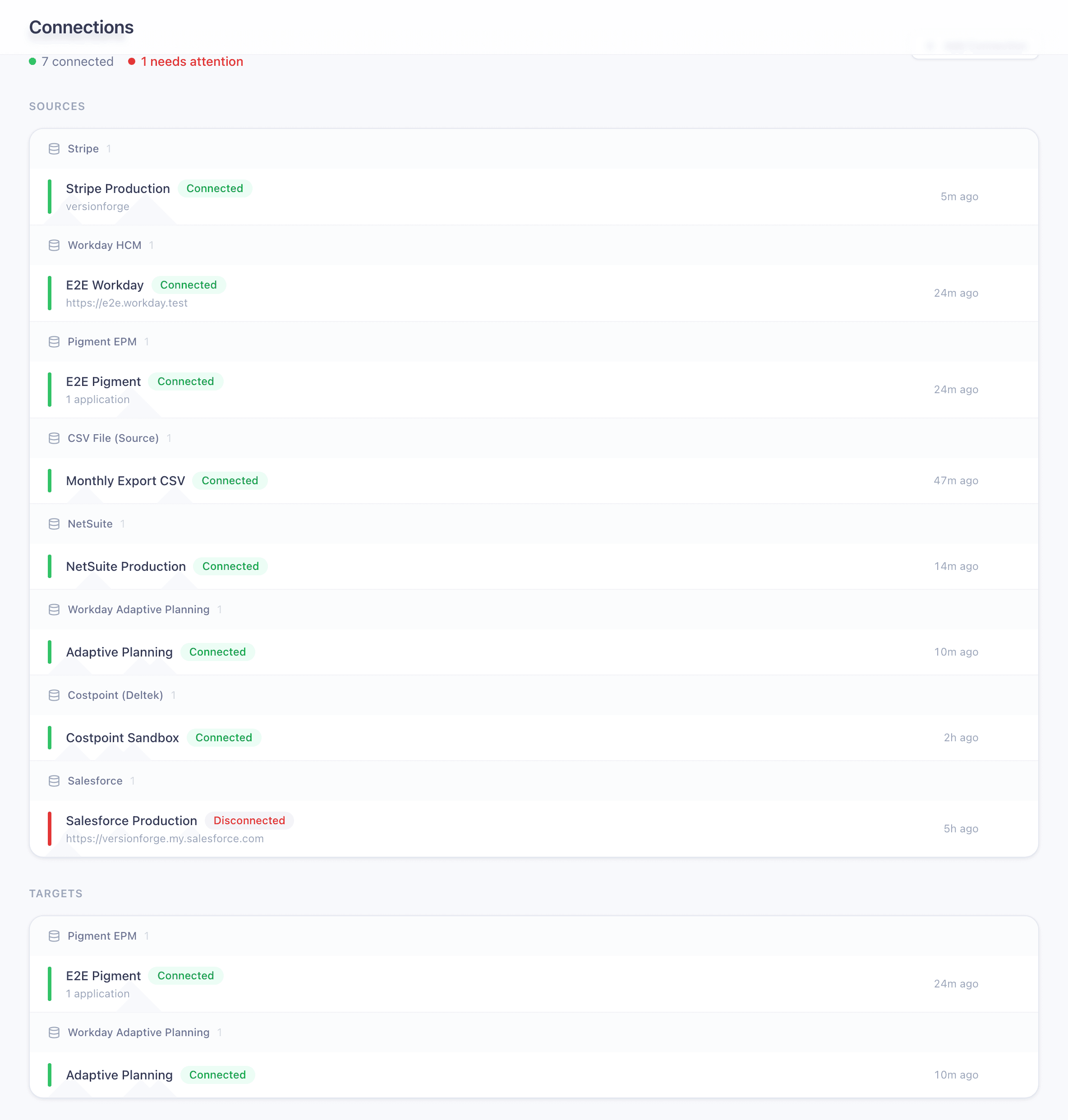
Connects Workday and ADP to the Planning Tools Your HR Team Uses
Each connector is purpose-built for headcount, comp, and org structure data. Field mappings, PII handling, and governance are native to each HRIS — not a generic adapter.
Workday HCM
LiveKeep headcount, compensation, and org structure current in your planning tool
- ●OAuth 2.0 + ISU auth
- ●Supervisory-org chunking for large tenants
- ●Compensation opt-in (PII handling)
- ●Completeness validation against roster totals
ADP Workforce Now
LiveSync workers, org structure, assignments, and base compensation into your planning model
- ●OAuth 2.0 + mutual TLS
- ●Workers, Organizations, Assignments, Compensation, Positions
- ●Worker-loop fan-out with bounded concurrency
- ●Certificate expiry monitoring
Adaptive Planning
LivePush approved data directly into modeled sheets — no CSV import step
- ●Sheet and version targeting
- ●Dimension auto-create on new members
- ●Per-row error mapping with remediation
- ●Batched import via XML API
Pigment
LiveSync revenue, headcount, or GL data into Pigment driver tables
- ●Bulk CSV upload to any model
- ●Import config discovery and validation
- ●Dimension member auto-create
Costpoint (Deltek)
LivePull project accounting, timesheets, and cost transactions from government contractors' ERP
- ●OAuth 2.0 + Basic Auth
- ●Projects, Employees, Accounts, Orgs, Vendors
- ●Timesheets and cost transactions
- ●Offset-based pagination with 100K safety cap
NetSuite
LivePull GL actuals, AR, AP, and trial balance into your planning model
- ●SuiteQL extraction
- ●Saved Search support
- ●Automated trial balance cross-check
- ●GL, AR, AP, Journal Entries, Trial Balance, Accounts, Subsidiaries
CSV
LiveImport from or export to flat files for migration, testing, or one-off loads
- ●Source and target modes
- ●Encoding auto-detection
- ●Delimiter auto-detection
Salesforce
LiveExtract CRM pipeline, account, and contract data into your planning model
- ●JWT Bearer auth (no interactive login)
- ●REST + Bulk API 2.0 auto-switching
- ●Opportunities, Accounts, Contacts, Contracts, Users
- ●Incremental extraction via SystemModstamp
Stripe
LiveBring subscription revenue, invoices, and customer data into your planning model
- ●Customers, Subscriptions, Invoices, Products, Prices
- ●Incremental extraction
- ●Auto-pagination for large accounts
Coming soon: SuccessFactors, SAP S/4HANA
Every connection in one view
Catch the Headcount Variance Before the Next Org Review
After every sync, VersionForge reconciles Workday roster totals against your Adaptive or Pigment plan automatically. If FTEs, cost centers, or comp bands don't tie, you know immediately — not when the CHRO opens the headcount review and finds a number nobody can defend.
Workday HCM
Active FTE Total
1,284.6 FTE
Adaptive Workforce
Active FTE Total
1,284.6 FTE
Cross-Check Result
Sync halts on mismatch
If totals diverge, nothing pushes until you investigate
Configurable tolerance
Set acceptable variance per connector and version
Full audit trail
Every run stores verification results for your auditors
Runs automatically
Cross-check is built into every sync, not a separate step
What happens when it fails?
When VersionForge detects a mismatch between source and target totals, the sync halts immediately. You see exactly which records diverged, the magnitude of the discrepancy, and when it was introduced — before anything touches your planning model. No silent failures. No discovering the variance at month-end close.
The mapping layer between your systems

Built for Teams That Answer to Auditors
VersionForge touches your most sensitive financial and workforce data. We built the security posture your InfoSec team will ask about before you ask us about features.
Encryption
AES-256-GCM at rest, TLS 1.3 in transit. Credentials stored in an encrypted vault with per-tenant key isolation.
SOC 2 Type II
Audit in progress. Contact us for our current security questionnaire and penetration test results.
Infrastructure
Hosted on AWS (US regions). Data never leaves your chosen region. Multi-tenant isolation at the database level.
Audit Retention
Configurable from 90 days to 7+ years. Every sync generates an immutable run log with source hash, row-level diffs, approver identity, and timestamp — exportable for external auditors.
Authentication & Access
SSO/SAML support on Enterprise plans. Workday ISU credentials scoped to your security groups — compensation data is opt-in at the Workday tenant level, not the application level.
Compliance
Data Processing Agreement available on request. VersionForge is designed for SOX-compliant environments with segregation of duties, approval workflows, and fail-closed sync controls.
100% success rate. Zero errors this period.
Stop Rebuilding the Roster Every Monday
Every week, someone on your team exports the Workday roster, rebuilds the plan, and reconciles the FTE totals by hand. VersionForge replaces that with an automated sync — and an AI assistant that can answer headcount and comp questions in plain English.
Ask your AI assistant:
- >"What's our current headcount, and does it tie to Workday?"
- >"Which employees moved cost centers this week?"
- >"Show me the comp changes flagged for dual review"
What's our current headcount, and does it tie to Workday?
Headcount reconciled at 6:00 AM today:
Active FTEs: 1,284.6
Cross-check: PASS (delta: 0.0)
Events: 9 hires, 4 terms, 2 comp changes flagged
Powered by Model Context Protocol (MCP)
Built by Vantage Advisory
VersionForge is built by the team at Vantage Advisory Group — consultants who have spent years implementing Workday, NetSuite, Stripe, Salesforce, Adaptive, and Pigment integrations for finance, RevOps, and workforce-planning teams. We built the product we kept wishing existed.
See It Running on Your Own Data in 30 Minutes
Book a walkthrough with the founding team. Bring your messiest data pipeline — GL close, MRR reconciliation, or headcount plan. We'll show you how VersionForge handles it.